
Products with shared inventory
In Sharefox, different products can use the same inventory. This is useful when you offer the same physical resource in different ways, or when you offer product packages that include resources that can also be booked separately.
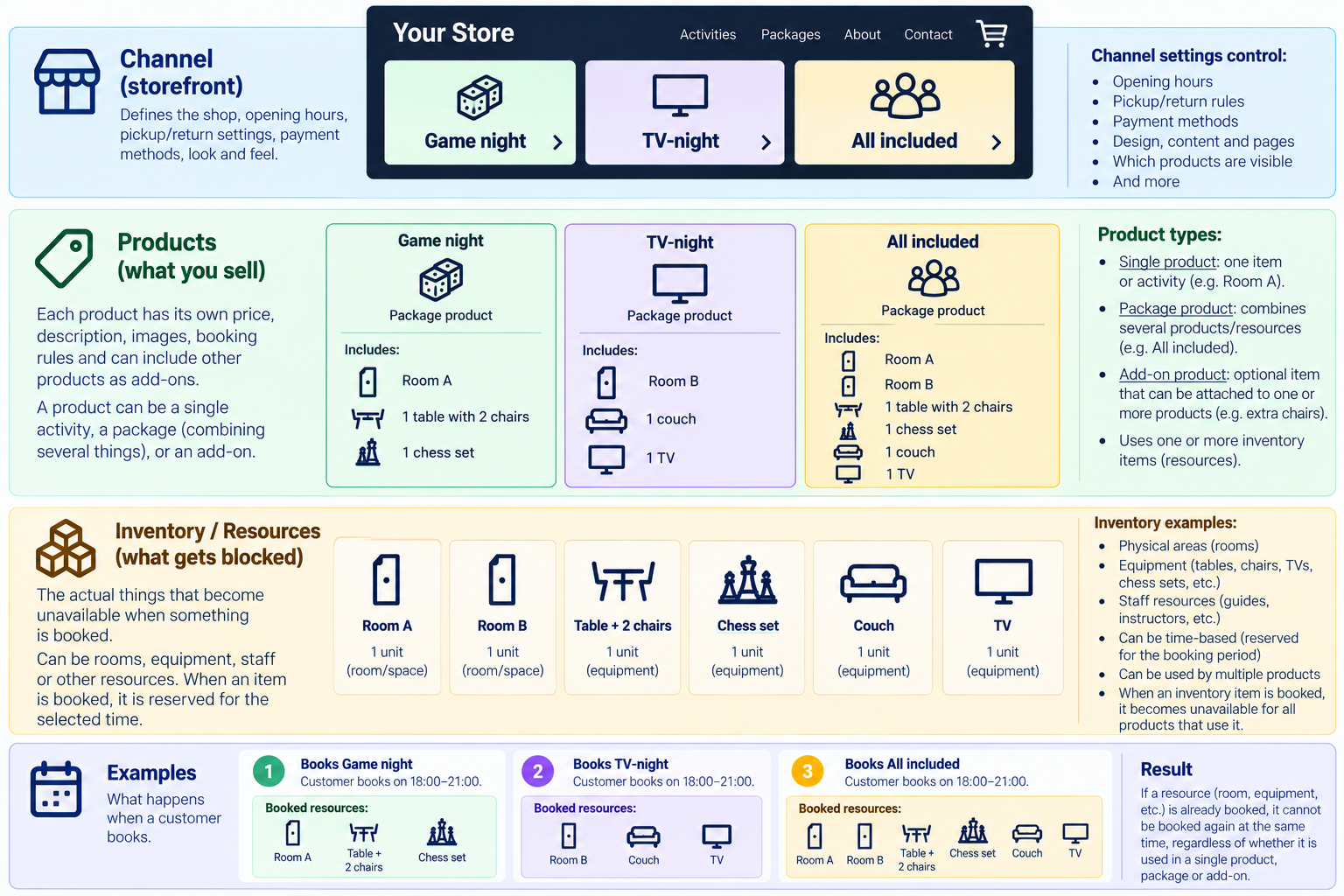
Products with shared inventory
For example, imagine that you have two rooms and some equipment:
- Room A
- Room B
- One table with two chairs
- One chess set
- One couch
- One TV
You want to offer three different products:
- Game Night includes Room A, the table and chairs, and the chess set.
- TV-Night includes Room B, the couch, and the TV.
- All Included includes both rooms and all the equipment.
The products are different, but they share the same underlying inventory.
How shared inventory affects availability
Availability is based on the inventory used by each product.
- If a customer books Game Night, Room A, the table and chairs, and the chess set are reserved for that booking period.
- Because All Included also requires these resources, All Included cannot be booked for an overlapping period.
The same applies in the other direction. If a customer books All Included, all six inventory items are reserved. This means neither Game Night nor TV-Night can be booked for the same period.
This allows you to create several products and packages without accidentally accepting two bookings that require the same physical resource.
Products and inventory are not the same thing
A product is what you offer to the customer. It has its own name, description, price, images and booking settings.
Inventory represents the actual resources available for booking.
Depending on your business, inventory can represent things such as:
- Individual rental items
- Rooms or areas
- Equipment
- Vehicles
- Other resources with limited availability
Several products can use the same inventory item.
For example, you do not need separate chess sets called “Game Night chess set” and “All Included chess set” if there is only one physical chess set. Both products should use the same inventory.
That shared inventory is what connects the products and prevents double bookings.
Different packages can share the same resources
A package can reserve several inventory items, and the same inventory item can be used by several different packages.
In our example, all three products are packages:
- Game Night uses Room A, the table and chairs, and the chess set.
- TV-Night uses Room B, the couch, and the TV.
- All Included uses all six inventory items.
The important part is that these are the same inventory items, not separate copies created for each package.
For example, Room A is used by both Game Night and All Included. If Room A is reserved through a Game Night booking, it is no longer available for All Included during the same period.
Likewise, if All Included is booked, all six inventory items are reserved. This makes both Game Night and TV-Night unavailable for an overlapping period.
Sharefox can therefore calculate availability across different products and packages based on the inventory they have in common.
When should you use shared inventory?
Shared inventory is useful whenever two or more products depend on the same limited physical resource.
A simple way to think about it is:
Products are what you sell. Inventory is what gets booked.
If booking one product should prevent another product from being booked at the same time, check whether those products should share one or more inventory resources.
The availability of a package is determined by the inventory of the individual products included in the package. The package itself may therefore show no number of items in stock.
The package will remain available as long as all the individual products inside it are available. For example, if I have 10 scooters and 12 helmets, once all the scooters have been rented, the entire package will be unavailable even if I still have 2 helmets available.
How to set it up
First, create the individual base products that will be used as resources:
- Room A
- Room B
- Table with chairs
- Couch
- Chess set
- TV
Then create the packages and add those individual products as included products:
Game Night
Add as included products:
- Room A
- Table and chairs
- Chess set
TV Night
Add as included products:
- Room B
- Couch
- TV
Finally, create the package that includes all the resources:
All Included
Add as included products:
- Room A
- Room B
- Table and chairs
- Couch
- Chess set
- TV
Because the TV is included in both TV Night and All Included, booking one of these packages reserves the TV and prevents the other package from being booked for the same time period.
If TV Night is booked, Game Night can still be booked because the two packages do not share any products or inventory. All Included, however, cannot be booked because it requires the same resources that have already been reserved by TV Night.
Note: Do not include packages in other packages. Include only individual base products.
The system will not check availability on more than two levels — the package itself and the included items. If one of those included items is a package the system will see that the package itself is available, but it will not check if all the individual items inside that package are available.