
How to read the payments tab
The payments tab can look confusing at first glance, but there is actually both rhyme and reason to it.
This article explains how to read it.
The columns

ORDER ID
Shows the order or change order ID.
TIP: Hover over the ID. If it turns green, you can switch to that change order by clicking on it. This is useful, for instance, when you want to refund from a particular change order.
PAYMENT TYPE
Shows the payment type.
TIMESTAMP
Shows when the action happened.
AMOUNT
Shows the amount.
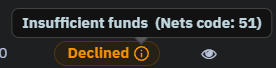
STATUS
Can be:
- "Accepted" = successful, all is good
- "Declined" = failed
- If you hover over the small ⓘ it will in most cases show you why it failed
TRANSACTION REFERENCE
This is the Nets or Stripe transaction reference. It's used if you need to contact Nets or Stripe support.
PAYMENT CARD
The last four digits on the card used.
CARD EXP MONTH
Shows the expiration month of the card.
If the card has expired a charge can not happen. The customer must log in and update their card.
SCHEDULED
Can be:
- "Inactive" = was set to charge on the Scheduled Time and was later turned off either manually or by the system
- "Active" = is set to charge on the Scheduled Time
- [blank] - If Scheduled is blank the action was completed
SCHEDULED TIME
The date when the Payment Type action happened or is scheduled to happen.
Manager/admin can change the status and the scheduled time on subscription payments that are in the future, by clicking the pencil symbol.
NOTE: Do NOT change the date to today or a date in the past. If you want to charge as soon as possible — use tomorrow's date.
Payment types / actions
Main payment (Reservation)
- Triggered by opening the checkout page
- This is a reservation, not a payment
Booking payment (Capture)
This is the actual payment .
- "Declined" (yellow) = not paid
- "Accepted" (green) = paid
Product subscription (Capture)
A regular monthly charge in a subscription.
- "Declined" (yellow) = not paid
- "Accepted" (green) = paid
If the charge failed (declined) the system will set the line as "Declined" and "Inactive" and schedule a retry in x days. The number of days between retries depends on your shop's settings, default is 3 days.
NOTE: If the customer has missed more than one payment the system will try to charge the next payment the day after the first successful charge — until payments are caught up.
Manual payment (Capture)
A manual payment added by a manager/admin when customer has made a payment outside of Sharefox.
Refund (Capture)
This is a refund made manually by a manager/admin. There are no automatic refunds.
- "Declined" (yellow) = not refunded
- "Accepted" (green) = the money has been refunded
New card setup (Reservation)
The customer has added a card from the "My orders" page.
This is not a payment, it only changes the card used for future payments.