
Utilisation Report
The Utilisation Report gives you a clear picture of how well your rental inventory is being used - combining revenue, rental counts, and the ratio of days items were out on rent versus the total days they were available (utilisation %).
To find the report go to Admin - Reports - Utilisation.

Release note: At the moment, the current version is best suited for short to medium term rentals. Full support for subscriptions and open-ended rentals is coming soon.
What it shows
The report shows, for each product (or variant / inventory item):
| Column | What it means |
|---|---|
| Revenue | Total rental revenue generated in the selected period |
| Rentals | Number of rental deliveries |
| Inventory days | Total available days across all units in inventory during the period |
| Rental days | Total days items were actively out on rent during the period |
| Utilisation % | Rental days / Inventory days |
| Revenue / day | Revenue / Rental days (average daily earning per rented day) |
Revenue figures include VAT.
Only orders with status Booked or Closed are included.
Orders not yet contracted (Eg. Draft, Offer) or internal orders are excluded.
Deliveries with status Dropped, Cancelled, or Changed do not count towards the rental days.
Filters and options

Time period
Use the period picker to choose a preset (Last 7 days, Last 30 days, Last 3 months, Last 12 months, This Year, Last Year) or set a custom date range. The period applies to the rental overlap - a booking that started before the period but ends inside it will only count the days that fall within the selected range.
You can also type a shorthand directly into the search box inside the picker and press Enter:
| Shortcut | Examples |
|---|---|
Nd or N days |
7d , 14 days, last 30 days |
Nw or N weeks |
2w, last 2 weeks |
NmoorN months |
3mo, 6 months |
NyorN years |
1y, 2 years |
ytd |
year to date |
Categories
Filter based on product categories. Note: one product can show in multiple categories.
Search
Type in the search box to filter by product name. Or switch to Inventory using the toggle, and search by inventory ID.
Granularity tabs
| Tab | What you see |
|---|---|
| Products | One row per rental product |
| Inventory | One row per inventory item, listed based on its custom ID |
| Variants | One row per variant (e.g. size S / M / L) within each main product. Only visible when at least one product has variants. |
Calculation method (Settings)
Click the settings icon to choose how rental duration is counted:
- Days (default): counts full calendar days of overlap between the rental period and the reporting period.
- Hours: uses the actual pickup / return times. Rentals shorter than 4h count as 0.5 days; 4-8 h count as 1 day; longer rentals are rounded up to the nearest full day.
Exporting data
Click Download CSV or Download XLSX (in the table toolbar) to export data from the current filtered and sorted view.

Comparing periods
Often it can be helpful to compare a period with another similar period, to understand how the company has improved.
Under the period selector in the top left corner, at the bottom, you can select "Compare periods". Under this you have three options for how to compare the current period (selected using the options below this in the drop down):
- Same period a year before
- If the orignal period was 1. jan 2026 to 31. jan 2026, the comparison period will be 1. jan 2025 to 31. jan 2025
- Previous period
- If the orignal period was 1. jan 2026 to 31. jan 2026, the comparison period will be 1. dec 2025 to 31. dec 2025
- Custom period
- Here you can choose a period of your own choosing. E.g. suitable for comparing Easter one year compared to another year, as they fall on different days.
On comparing periods, the revenue, rentals and utilisation cards will indicate the change on the current vs the comparison period.
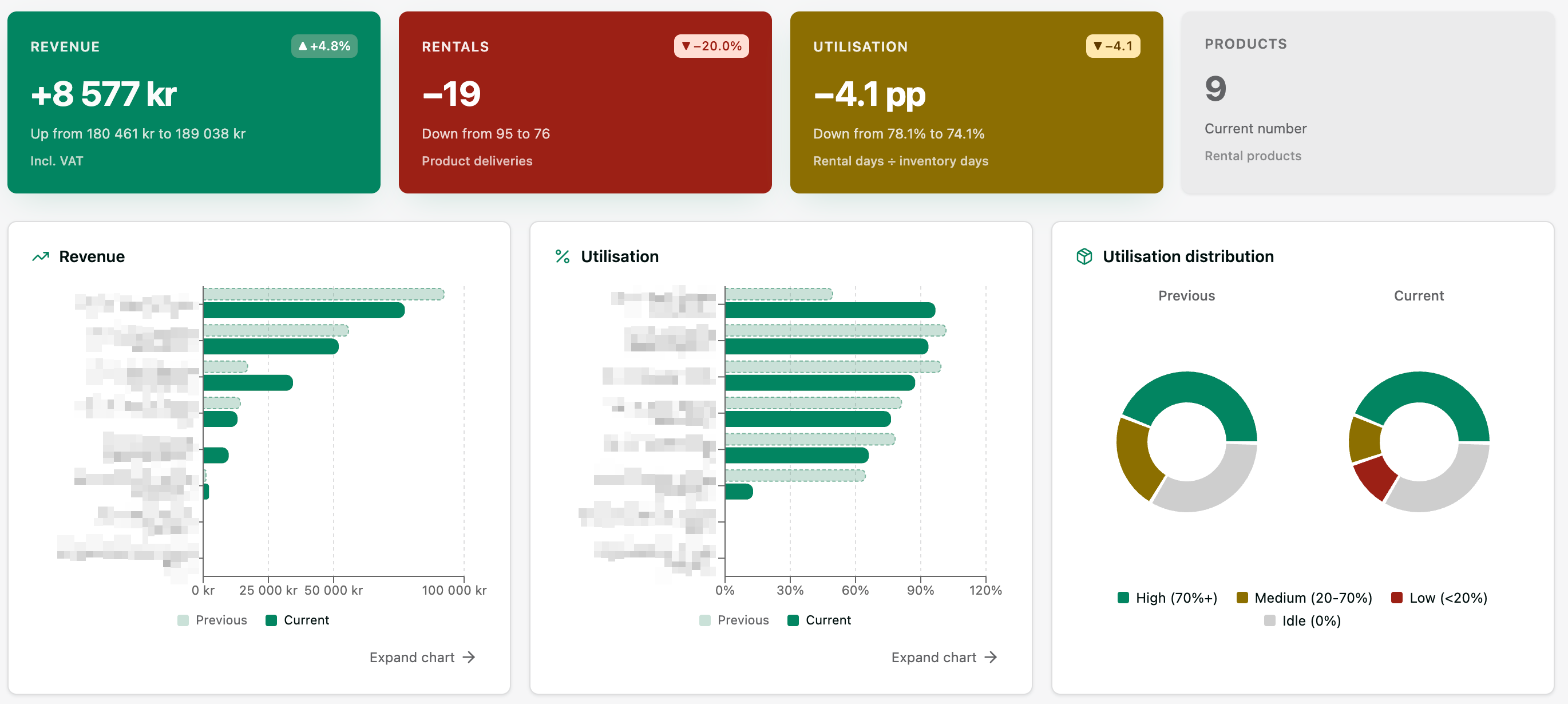
The Revenue, Rentals, and Utilisation cards will show as green if there is a positive difference between the current and previous period, indicate the difference between them in number and %. The colors are set like this:
- Green card: Positive difference
- Grey card: 0 % difference
- Yellow card: 0-5 % difference
- Red card: >5 % difference
(For Utilisation the numbers are for percentage points (pp).
In the Per Product table, you can see thte % chage compared to the previous period in the colored chip next to the total number for the current period (The revenue/rental numbers are not the difference, but the actual values for the current (original) period selected.
If you are on a Mac / PC, you can hover your cursor above the % chip, to see the "current" and "previous" values.
To the right of the table you can download the full dataset of both current and previous period, to more easily compare all values in e.g. Excel.
Tip: Select categories on top, one-by-one, to get well defined category reports and easier see what needs action.
More details
Why can utilisation % exceed 100%?
A value above 100 % is not a bug - it means more rental days were recorded than the inventory system currently accounts for. This typically happens in one of these situations:
- Store had a lot of short-term rentals - Rental days are summed per booking, but inventory days count each unit only once per calendar day. When the same unit is turned around several times in one day, each rental adds to rental days while inventory days stay the same. Stores with high turnover (hourly hires, same-day returns) may see such high utilisation
- A tool was deleted after the rental period - The utilisation calculation only counts inventory units that currently exist in the system (not deleted). If a tool was rented but has since been deleted its rental days still appear in past order records, but the tool no longer contributes to the inventory days count. The result is that the numerator (rental days) is higher than the denominator (inventory days), pushing utilisation above 100 %. Archiving inventory items (instead of deleting them) would benefit utilisation reporting.
Video
Url: https://www.youtube.com/watch?v=QA9ycsjNCgQ
.